
Core Concepts#
This section introduces the core concepts in Pantheon. Understanding these fundamental building blocks will help you effectively use the framework to build sophisticated multi-agent systems.
Overview#
Pantheon is built around several key abstractions that work together to create powerful AI systems:
Agents - AI-powered entities with specific instructions and capabilities
Teams - Collections of agents working together in coordinated patterns
Memory - Systems for persisting information across interactions
Toolsets - Functions and services that extend agent capabilities
Providers - Interfaces for connecting to external tool sources (MCP, remote toolsets)
Endpoints - Network services for distributed deployment
ChatRooms - Interactive interfaces for agent conversations
Learning - Skillbook-based system for agent improvement over time
Evolution - LLM-driven program optimization
Agent#
An Agent is the fundamental building block in Pantheon - an AI-powered entity that can understand instructions, use tools, maintain memory, and collaborate with other agents.
What is an Agent?#
An agent in Pantheon is:
Autonomous: Can make decisions and take actions independently
Tool-enabled: Can use various tools to extend its capabilities
Stateful: Maintains context and memory across interactions
Collaborative: Can work with other agents in teams
Learnable: Can improve through the skillbook system
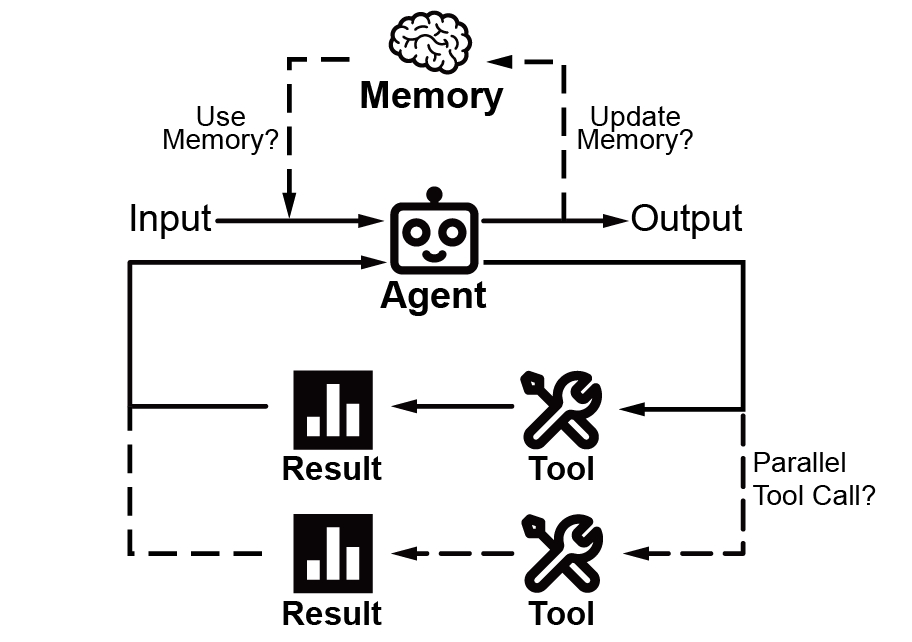
Essentially, an Agent program is a loop that calls an LLM. In this loop, tool invocation is involved to interact with the external environment, and memory management is involved to save the results into the context.
Instructions#
Every agent has instructions that define its behavior and personality. These instructions serve as the agent’s core directive, guiding its responses, approach, and interaction style. Well-crafted instructions are crucial for creating agents that behave consistently and effectively.
Tools and Capabilities#
Agents become powerful through tools - functions that extend their abilities beyond pure conversation. Tools allow agents to interact with external systems, perform calculations, access databases, browse the web, execute code, and much more. The tool system is extensible, allowing you to add custom capabilities tailored to your specific needs.
Model Selection#
Agents can use any LLM from the supported providers (OpenAI, Anthropic, Gemini, DeepSeek, and more). Model selection can be configured at the agent level or globally through settings. Fallback chains allow graceful degradation when primary models are unavailable.
Team#
Teams in Pantheon enable multiple agents to collaborate on complex tasks. Different team structures support various collaboration patterns, from simple sequential processing to sophisticated multi-agent reasoning.
What is a Team?#
A team is a coordinated group of agents that:
Collaborate: Work together towards a common goal
Specialize: Each agent can focus on specific aspects
Communicate: Share information and context
Coordinate: Follow structured interaction patterns
Team Types#
PantheonTeam (Recommended)#
The default team type with intelligent agent delegation. A lead agent can dynamically delegate tasks to specialist agents using call_agent() and discover available agents with list_agents().
Use Cases:
Complex workflows requiring specialized expertise
Dynamic task routing
Hierarchical agent organizations
Sequential Team#
Agents process tasks in a predefined order, with each agent building on the previous one’s output. This creates a pipeline where each agent specializes in one stage of a multi-step process.
Use Cases:
Multi-step workflows
Progressive refinement
Pipeline processing
Swarm Team#
Agents can dynamically transfer control to each other based on the task requirements. This creates a flexible system where the conversation flow adapts based on the specific needs of each interaction.
Use Cases:
Dynamic routing
Specialized handling
Flexible workflows
SwarmCenter Team#
A central coordinator agent manages and delegates tasks to worker agents. The coordinator analyzes incoming requests and intelligently distributes work to the most appropriate specialists.
Use Cases:
Task distribution
Centralized management
Load balancing
Mixture of Agents (MoA) Team#
Multiple agents work on the same problem independently, then their outputs are synthesized. This ensemble approach leverages diverse perspectives and reasoning strategies to produce more robust and comprehensive solutions.
Use Cases:
Ensemble reasoning
Diverse perspectives
Robust solutions
Agent as Tool Team (AaT)#
A leader agent treats sub-agents as tools, calling them when specific expertise is needed. This creates a hierarchical structure where the leader orchestrates specialized workers.
Use Cases:
Hierarchical workflows
Specialized sub-tasks
Tool-like agent integration
Team Coordination#
Message Flow#
Teams manage message flow between agents:
        graph LR
    subgraph "Sequential Flow"
        U1[User] --> A1[Agent1]
        A1 --> A2[Agent2]
        A2 --> A3[Agent3]
        A3 --> R1[Response]
    end
        graph LR
    subgraph "Swarm Flow"
        U2[User] --> A4[Agent1]
        A4 <--> A5[Agent2]
        A5 <--> A6[Agent3]
        A6 --> R2[Response]
    end
        graph LR
    subgraph "MoA Flow"
        U3[User] --> A7[Agent1]
        U3 --> A8[Agent2]
        U3 --> A9[Agent3]
        A7 --> AG[Aggregator]
        A8 --> AG
        A9 --> AG
        AG --> R3[Response]
    end
Context Sharing#
Teams share context between agents to maintain continuity and accumulate knowledge throughout the collaboration. This enables agents to build upon each other’s work, share discovered information, and maintain a coherent understanding of the task at hand.
Memory#
Memory systems in Pantheon enable agents to maintain context, learn from interactions, and share knowledge. This persistence is crucial for building agents that can handle complex, multi-turn conversations and collaborative tasks.
What is Memory?#
Memory in Pantheon provides:
Persistence: Information survives beyond single interactions
Context: Agents remember previous conversations
Learning: Agents can accumulate knowledge over time
Sharing: Multiple agents can access common information
Compression: Long conversations can be compressed to fit context windows
Toolset#
Toolsets extend agent capabilities by providing access to external functions, APIs, and services. They bridge the gap between AI reasoning and real-world actions.
What is a Toolset?#
A toolset is a collection of functions that agents can use to:
Execute Code: Run Python, R, Julia, or shell commands
Access Information: Browse web, query databases
Manipulate Files: Read, write, edit files
Integrate Services: Connect to external APIs
Perform Computations: Complex calculations and analysis
Manage Knowledge: Vector stores and RAG systems
Built-in Toolsets#
File Operations#
FileManagerToolSet- Read, write, edit, search files with intelligent diffing
Code Execution#
PythonInterpreterToolSet- Execute Python codeShellToolSet- Run shell commandsIntegratedNotebookToolSet- Jupyter notebook integration with kernel management
Web & Search#
WebToolSet- Web browsing and search capabilitiesScraperToolSet- Web scraping with crawl4ai
Knowledge & RAG#
KnowledgeToolSet- Knowledge base management with LlamaIndexVectorRAGToolSet- Vector-based retrieval augmented generation
Specialized#
TaskToolSet- Ephemeral task trackingPackageToolSet- Package discovery and method extractionEvolutionToolSet- Program evolution and optimizationSkillbookToolSet- Skill management for agents
Creating Custom Tools#
Simple Function Tools#
Convert any Python function into a tool using the @tool decorator:
from pantheon.toolset import ToolSet, tool

class MyTools(ToolSet):
    @tool
    def my_function(self, param: str) -> str:
        """Description for the LLM to understand when to use this tool."""
        return f"Result: {param}"
Async Tools#
Support for asynchronous operations:
@tool
async def fetch_data(self, url: str) -> str:
    """Fetch data from a URL."""
    async with aiohttp.ClientSession() as session:
        async with session.get(url) as response:
            return await response.text()
Provider#
Providers are interfaces for connecting agents to external tool sources. They abstract the complexity of different tool backends.
What is a Provider?#
A provider enables:
Tool Discovery: Automatic discovery of available tools
Remote Execution: Running tools on remote machines
Protocol Support: Different communication protocols (MCP, NATS, HTTP)
Tool Filtering: Selective exposure of tool subsets
Provider Types#
MCPProvider#
Connect to Model Context Protocol (MCP) servers:
from pantheon.providers import MCPProvider

# STDIO-based MCP server
mcp = MCPProvider("npx -y @anthropic/mcp-server-filesystem")

# With tool filtering
mcp = MCPProvider("...", filter_prefix="fs_")
LocalProvider#
Use local ToolSet instances:
from pantheon.providers import LocalProvider
from pantheon.toolsets import FileManagerToolSet

provider = LocalProvider(FileManagerToolSet("files"))
ToolSetProvider#
Connect to remote Pantheon toolsets via NATS:
from pantheon.providers import ToolSetProvider

provider = ToolSetProvider(service_id="remote-toolset-id")
Endpoint#
Endpoints in Pantheon enable distributed deployment of agents and toolsets by exposing them as network services.
What is an Endpoint?#
An endpoint is a network-accessible service that:
Exposes Functionality: Makes agents or tools available over the network
Manages Toolsets: Coordinates multiple tool providers
Handles MCP: Manages MCP server lifecycle
Provides Workspace: File transfer and workspace management
Deployment Patterns#
Local Endpoint#
Run everything in a single process:
from pantheon.endpoint import Endpoint

endpoint = Endpoint(workspace_dir="./workspace")
Distributed Deployment#
Deploy components across machines:
# On toolset server
toolset = PythonInterpreterToolSet("python")
await toolset.serve()  # Exposes via NATS

# On agent server
agent = Agent(...)
await agent.remote_toolset("service-id")
ChatRoom#
ChatRoom is an interactive service that provides a user-friendly interface for conversations with agents and teams.
What is a ChatRoom?#
A ChatRoom is a service layer that:
Hosts Conversations: Manages interactive sessions with agents
Provides Interface: Offers web UI and API access
Manages State: Maintains conversation history and context
Handles Concurrency: Supports multiple simultaneous users
Enables Persistence: Saves and restores chat sessions
Core Features#
Session Management#
ChatRooms manage user sessions automatically, handling multiple concurrent conversations while maintaining isolation between users.
Web UI Integration#
Connect to Pantheon’s web interface at https://pantheon-ui.vercel.app/ for a rich, interactive chat experience.
REPL#
The REPL (Read-Eval-Print Loop) provides an interactive command-line interface for working with agents and teams.
What is the REPL?#
The REPL is a feature-rich CLI that provides:
Interactive Chat: Converse with agents in real-time
Syntax Highlighting: Code and markdown rendering
File Viewer: Full-screen file viewing with
/viewcommandApproval Workflows: Interactive approval dialogs for agent actions
Command System: Extensible slash commands
History: Persistent command history across sessions
Key Commands#
/help- Show available commands/view <file>- Full-screen file viewer with syntax highlighting/clear- Clear conversation context/compress- Compress conversation history/exit- Exit the REPL
Learning & Skillbook#
The learning system enables agents to improve over time by extracting and applying skills from successful interactions.
What is a Skillbook?#
A skillbook is a persistent store of learned behaviors:
Skill Extraction: Automatic extraction of successful patterns
Success Tracking: Track helpful vs. harmful skill applications
Skill Injection: Inject relevant skills into agent prompts
Contradiction Resolution: Handle conflicting skills
Learning Pipeline#
Execution: Agent performs tasks
Reflection: Reflector analyzes execution patterns
Extraction: Skills are extracted from successful patterns
Validation: Skills are validated against existing knowledge
Storage: Valid skills are stored in the skillbook
Application: Skills are injected into future prompts
Evolution#
The evolution system enables LLM-driven program optimization and improvement.
What is Evolution?#
Evolution in Pantheon provides:
Program Improvement: Iteratively improve code through LLM feedback
Hybrid Evaluation: Combine function-based and LLM-based evaluation
Version Tracking: Track program versions and changes
Parallel Evaluation: Evaluate multiple candidates concurrently
Use Cases#
Prompt optimization
Code refactoring
Algorithm improvement
Configuration tuning
Configuration#
Pantheon uses a layered configuration system for flexibility.
Configuration Layers#
User Global:
~/.pantheon/- User-wide settingsProject:
./.pantheon/- Project-specific settingsDefaults: Built-in package defaults
Configuration Files#
settings.json- General settings (models, timeouts, etc.)mcp.json- MCP server configurationsagents/*.md- Agent templatesteams/*.md- Team templates
Model Selection#
Configure default models and fallback chains:
{
  "default_model": "gpt-4o",
  "fallback_models": ["gpt-4o-mini", "claude-3-sonnet"],
  "model_overrides": {
    "reasoning": "o1-preview"
  }
}